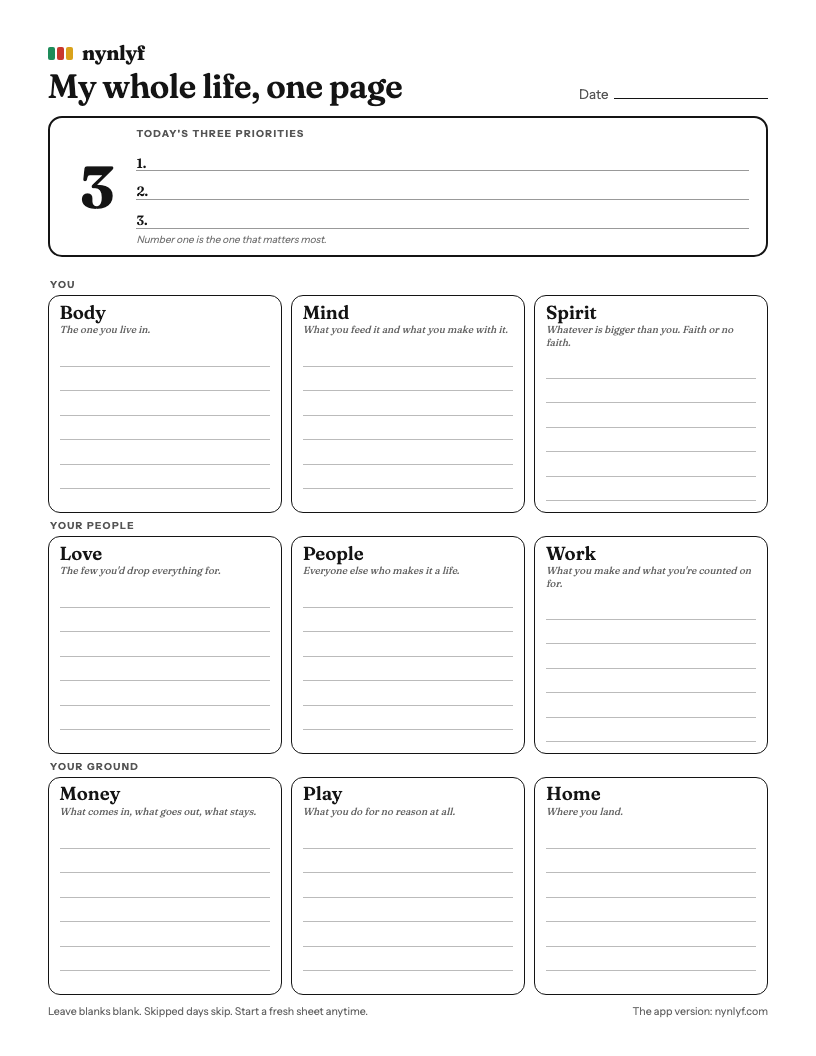
How to use it
- Write today's three at the top. Number one is the one that matters most. Not the easiest. Not the loudest.
- Fill the nine boxes. In each area, write what's going on. A task, a worry, a win, a name.
- Leave blanks blank. An empty box is information. It tells you where your attention hasn't been.
- Put it where you'll see it. The fridge, your desk, the bathroom mirror.
- Start a fresh sheet when it gets messy. No copying over. No catching up. Skipped days just skip.
The nine areas
You
BodyThe one you live in.
MindWhat you feed it and what you make with it.
SpiritWhatever is bigger than you. Faith or no faith.
Your peopleLoveThe few you'd drop everything for.
PeopleEveryone else who makes it a life.
WorkWhat you make and what you're counted on for.
Your groundMoneyWhat comes in, what goes out, what stays.
PlayWhat you do for no reason at all.
HomeWhere you land.
Not sure what goes where? Read the nine areas of life for a quick tour.
Where it came from
NynLyf started in 2014 as exactly this: a whole life on one sheet of paper. The app still has a Paper view that looks just like it, in plain black and white.
When paper isn't enough
Paper is great until it's in the other room. The app version lives on your phone, saves each day at midnight so you can look back, shows your calendar underneath, and syncs between your phone and laptop. It never sends a notification.
See your whole life on one screen.
Nine tiles. Three priorities. No streaks, no notifications, and a cat who naps on whatever you've been ignoring. $5 once for the first 500 Lyfers.
See my whole life, $5 Or poke around a demo life firstMore guides
- The nine areas of lifeA simple list, what goes in each area, and a five minute check.
- The Wheel of Life, made dailyThe classic coaching exercise, turned into a screen you actually open.
- The Lo Shu squareThe ancient 3x3 magic square where every line adds to 15.
- A planner that doesn't nagNo streaks, no badges, no notifications. Skipped days just skip.
- An ADHD planner that doesn't nagBuilt around the ways planners usually fail ADHD brains. Diagnosed or not.
- Why you quit every plannerFive reasons planners fall apart, and what to try instead.